One
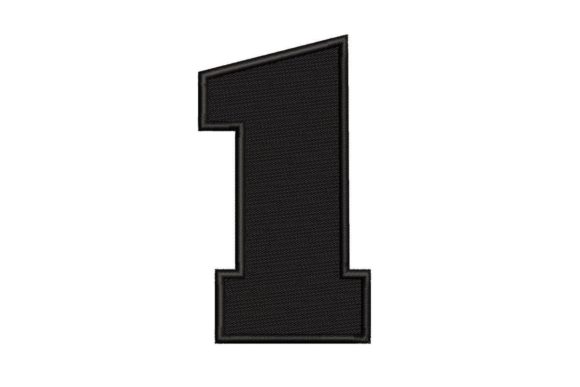
One is a deceptively simple machine embroidery design — a clean, balanced, and versatile representation of the numeral “1” — engineered for clarity, consistency, and immediate recognition. It’s not decorative flair or thematic storytelling; it’s functional typography made stitchable. Its value lies in its purpose: marking initiation. Whether you’re labeling the first prototype in a product development cycle, tagging the inaugural batch of handmade goods, or identifying the opening module in a training curriculum, One serves as a quiet but authoritative signal that something has begun.
This isn’t just another digit stitched onto fabric. It’s a precision-crafted asset built for real-world use across diverse workflows. It ships in multiple embroidery file formats — including PES, DST, EXP, JEF, VP3, and XXX — ensuring compatibility with mainstream home and commercial machines from Brother, Janome, Bernina, Husqvarna Viking, and Tajima. That breadth means you’re unlikely to hit a format wall mid-project — whether you're a solo quilter prepping fabric labels or a small-batch apparel brand digitizing care tags for launch inventory.
Where One Fits in Your Process
One integrates most naturally at transition points — moments where clarity about sequence, priority, or origin matters. Think of it as a lightweight metadata stamp: small in footprint, high in functional impact.
Before a project begins, One helps anchor intention. When launching a new client onboarding kit, stitching One onto the cover sleeve signals “this is version one — the foundation.” In education, instructors embroider One onto the front pocket of lab aprons issued to students beginning their first semester of textile studies — a subtle but tactile reinforcement of starting point and progression.
During execution, One supports organization and traceability. A small business producing custom tote bags might assign One to the first unit in each production run. Paired with a date stamp or batch code, it becomes part of an internal quality control loop — enabling quick identification of early outputs when reviewing fit, thread tension, or alignment consistency. Similarly, crafters testing new stabilizers or hoop techniques often mark their test swatches with One to distinguish baseline trials from later refinements.
After completion, One aids in archiving and iteration. Designers building a portfolio of embroidery samples may label their earliest successful file as “One” — not as a claim of superiority, but as a chronological anchor. Later, when revisiting that file to compare stitch density or color transitions against newer versions, the label acts as a consistent reference point across time.
Practical Integration Across Tools and Contexts
One doesn’t operate in isolation. Its usefulness multiplies when aligned with existing systems — digital, physical, or procedural.
- With design software: Load the PES or DST file directly into Wilcom, Embrilliance, or PE-Design to resize, recolor, or combine with logos or text blocks. Because the design is vector-based in origin and cleanly digitized, scaling between 1.5” and 4” maintains sharp edges and balanced stitch density — no re-digitizing needed.
- With hardware: Use the included .csv or .txt documentation (often bundled with the download) to log machine-specific settings — recommended stabilizer type, needle size, and max speed — saving setup time across devices or team members.
- With inventory or project tools: Link the physical embroidered One to your Trello board, Notion database, or Airtable record by assigning the same ID (e.g., “PROJ-001-ONE”). This creates a cross-medium reference: the stitch is the tangible counterpart to the digital task.
- With people: In collaborative workshops or maker spaces, One becomes a shared visual cue. When participants receive kits labeled with One, there’s no ambiguity about which materials correspond to Module One — reducing onboarding friction and minimizing repeated instructions.
Preparation and Setup That Actually Saves Time
Start with stabilization. One works best on medium-weight woven cotton, linen, or stable knits — but don’t assume all fabrics behave the same. Test on a scrap using your intended stabilizer (tear-away for stable fabrics, cut-away for stretchy ones). Note how the top thread nests and whether the underlay holds registration. A 60/8 sharp needle and 40-weight polyester thread are reliable defaults — but if you’re stitching on fleece or denim, switch to a 75/11 ballpoint or jeans needle and adjust upper tension slightly.
Hoop placement matters more than you might think. Since One is compact and symmetrical, centering it precisely in the hoop minimizes re-hooping if you’re stitching multiple items. Use a water-soluble pen to mark crosshairs on your fabric before hooping — then align those marks with your machine’s laser or crosshair guide. That 10-second step prevents dozens of micro-adjustments later.
File management is where long-term efficiency lives. Store your One files in a dedicated folder named “Core_Stitch_Assets”, not “Embroidery_Extras” or “Random_Downloads”. Inside, keep subfolders by format (PES, DST, etc.) and include a plain-text README noting the design dimensions, recommended hoop size (e.g., 4x4”), and any known quirks — like “works best at 850–950 SPM on Brother Innov-is NQ3500D.” Future-you will open that file and skip 20 minutes of trial-and-error.
Consistency Without Compromise
One supports consistency not through rigidity, but through repeatability. You’re not locking yourself into a single aesthetic — you’re securing a reliable starting point. That makes it especially useful for businesses standardizing branded assets. A boutique stationery brand might use One on the spine of their first limited-edition notebook series, then Two on the second, and so on — building a collectible logic customers recognize without needing explanation.
For educators, One anchors scaffolding. When teaching machine embroidery, begin every student’s first practical session with this design — not because it’s complex, but because it isolates core variables: hooping accuracy, thread pathing, start/stop behavior, and bobbin monitoring. Mastery here transfers directly to more intricate motifs. There’s no hidden learning curve — just clear cause and effect.
And for personal goals? One fits quietly into habit-building. Embroider it onto a journal cover the day you begin tracking daily creative output. Stitch it onto a gym bag before your first week of a new fitness routine. It’s not motivational fluff — it’s a tactile acknowledgment of commencement, grounded in action rather than aspiration.
Long-Term Use and Quiet Scalability
Because One is minimal and format-agnostic, it ages well. Unlike trend-driven designs that feel dated in six months, its utility is structural — like a header in a spreadsheet or a primary key in a database. You’ll still reach for it five years from now when onboarding a new intern, launching a side project, or archiving your third year of textile experiments.
It also scales sideways. Once you’ve established One as your marker for beginnings, you can extend the system intuitively: pair it with a simple dash or colon (“One:”) for phases within a phase, or combine it with initials (“One-JS”) to denote ownership or responsibility. None of this requires new files — just thoughtful application.
What makes One enduring isn’t novelty — it’s fidelity to function. It does one thing, clearly and reliably, across contexts where ambiguity slows progress. In a world of ever-increasing complexity, sometimes the most powerful tool is the one that says, without flourish or interpretation: This is where it starts.