Class of 2033 T-shirt: Smart Design Choices for Real-World Use
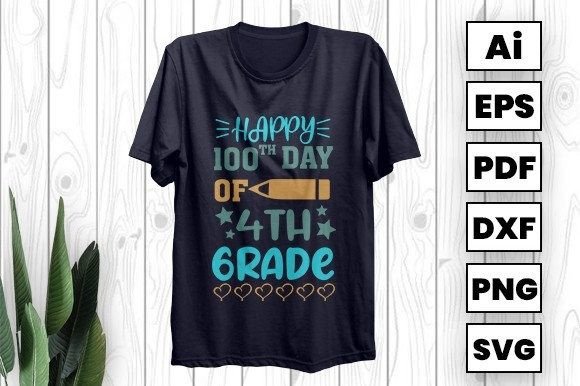
Whether you're planning a school spirit day, launching a custom merch line, or creating personalized back-to-school keepsakes, the Class of 2033 T-shirt design is more than just text on fabric—it’s a versatile digital asset built for flexibility, clarity, and professional output. Designed by a t-shirt team based in Bangladesh, this downloadable sublimation-ready artwork comes in AI, EPS, SVG, and PNG formats—giving creators across skill levels real control over how and where it appears.
What This Design Actually Offers (and What It Doesn’t)
This isn’t a pre-printed shirt or a one-size-fits-all template. It’s a high-resolution, vector-based design meant to be adapted—not assumed. You’ll get clean outlines, scalable layers, and editable typography in the AI file, making it suitable for vinyl cutting, iron-on transfers, scrapbooking layouts, engraved plaques, or even invitation suites. But here’s where many users stumble: they treat it like a “plug-and-play” image instead of a production-ready resource.
For example, some assume the PNG version is ideal for heat-transfer printing—only to discover later that its raster nature causes pixelation when resized beyond original dimensions. Others try to use the SVG directly in Cricut Design Space without checking if embedded fonts have been converted to outlines, leading to missing text or layout shifts. These aren’t flaws in the design—they’re gaps in preparation.
1. Skipping Format Verification Before Printing
Not all formats behave the same way across devices and software. The AI file gives you full editability—but only if you own Adobe Illustrator or compatible vector editors. If you’re using Silhouette Studio or Canva, the SVG or EPS may serve you better. And if you’re doing sublimation on polyester fabric, ensure your PNG has a transparent background and at least 300 DPI resolution at intended print size.
Better approach: Open each format in your primary design tool *before* committing to a project. Test scaling up to 200% in your editing software. If edges blur or text disappears, go back to the vector files (AI/EPS/SVG) instead of forcing a raster workaround.
2. Overlooking Color Mode and Output Intent
RGB works fine for screen-based uses—like social media posts or digital invitations—but if you’re printing physical items (especially with CMYK printers or dye-sublimation machines), RGB colors can shift dramatically. A vibrant teal on screen might print as muted green unless converted early.
Better approach: Convert your working file to CMYK *before* finalizing color choices for apparel or vinyl. Most vector editors allow batch conversion; if using PNG for sublimation, confirm with your printer whether they prefer sRGB or Adobe RGB profiles—and match accordingly.
3. Assuming “Editable” Means “Effortless to Customize”
The AI file lets you change colors, rearrange elements, or tweak spacing—but only if you understand basic vector workflows. Beginners often open it expecting drag-and-drop simplicity, then get stuck trying to ungroup layered effects or reposition outlined text. That’s not a limitation of the design; it’s a signal to invest five minutes in learning how to use the Direct Selection Tool or expand appearances.
Better approach: Watch a quick 3-minute tutorial on “how to edit AI files in Illustrator” before diving in. Or start with the SVG in free tools like Inkscape—many find it more intuitive for basic edits like recoloring or resizing text blocks.
What to Check Before You Download—or Share—This Design
- File integrity: After unzipping, verify all four formats are present and open without error. Corrupted downloads happen—especially on slower connections.
- License scope: This design is intended for personal, small business, and commercial use—including resale on printed products—but does not permit redistribution of the source files themselves.
- Compatibility notes: While SVG is widely supported, older versions of Microsoft Word or PowerPoint may render it incorrectly. For cards or invitations, export a PDF version first and embed fonts manually if needed.
- Realistic expectations for vinyl: Fine details (like thin serifs or tight kerning) may not cut cleanly on low-end machines. Simplify strokes or increase letter spacing slightly if using with Cricut Explore or Silhouette Cameo 3 and earlier.
Why This Fits Real Creators—Not Just Trend Chasers
You won’t find gimmicks here—no auto-generated slogans, no AI-diluted aesthetics. This Class of 2033 T-shirt design reflects thoughtful typography, balanced negative space, and intentional contrast—all optimized for legibility on dark and light garments alike. It’s made by people who actually print shirts, cut vinyl, and ship custom orders—not just upload files.
That’s why daily new designs matter: trends evolve, schools update branding guidelines, and educators request variations for inclusive representation (e.g., alternate fonts for dyslexia-friendly reading). Subscribing means staying aligned—not chasing outdated templates.
A Final Note on Value Beyond the Download
When you choose this design, you’re not just buying pixels—you’re supporting a team rooted in practical experience: garment decorators who know which ink holds up after 25 washes, educators who’ve tested printable layouts in classroom settings, and small business owners who’ve navigated cross-border shipping, customs forms, and local vendor partnerships.
So before you click “add to cart,” ask yourself: Does this file give me room to grow—not just today, but six months from now? Can I adapt it for a fundraiser, a graduation ceremony, or a bilingual welcome kit? If yes, you’re holding more than a design. You’re holding a starting point—with clear paths forward, not dead ends.
Stay connected. New designs drop daily—not for hype, but because real needs keep changing. And every one is built to work, not just look good.